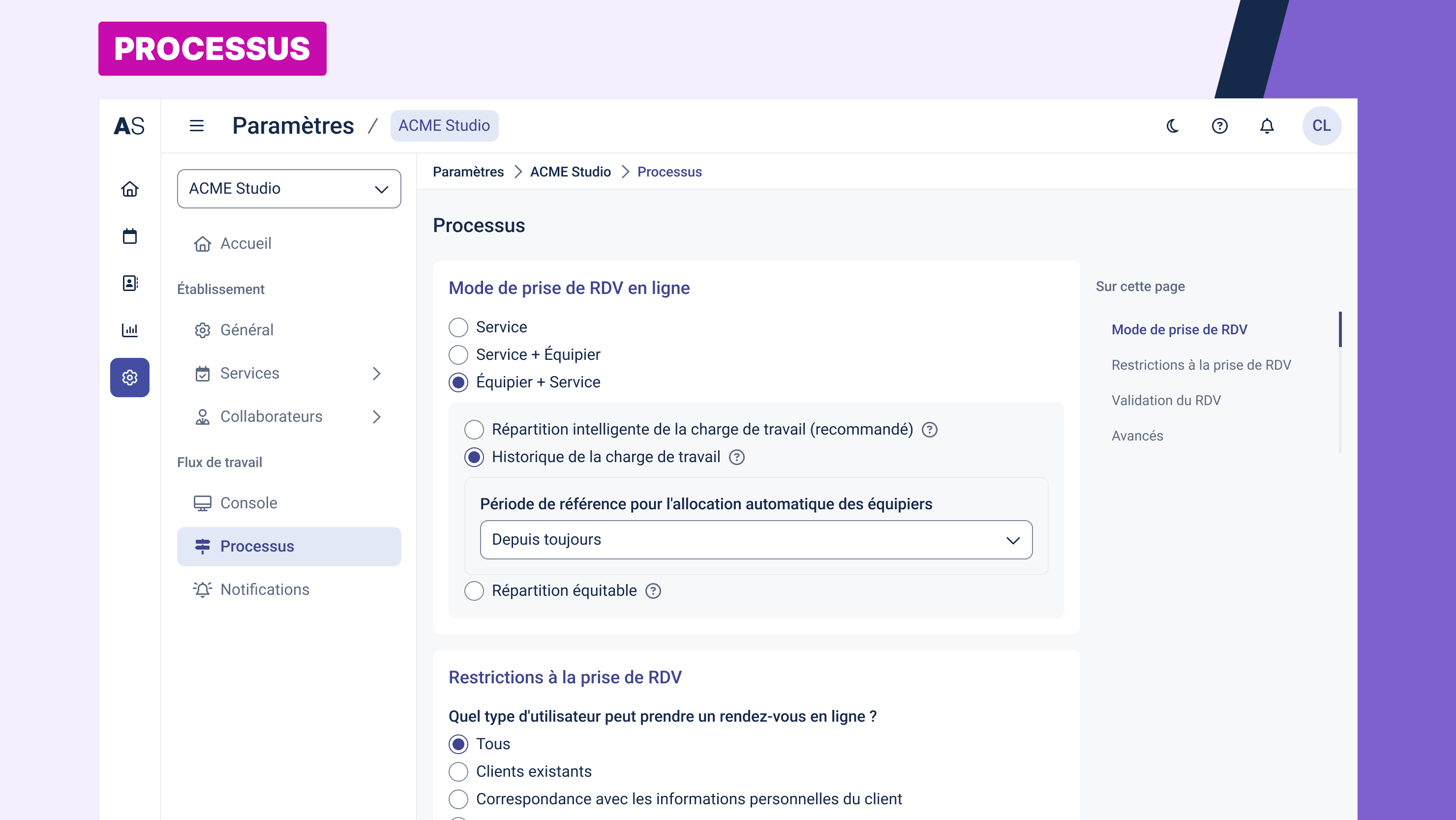
The Processes section allows you to configure how online appointment scheduling behaves: how collaborators are assigned, how travel time is handled, who can book, appointment validation rules, and more.
Online Appointment Booking Mode
This setting determines how appointments are associated with services and staff.
Available options:
Service: the client selects a service only; the system assigns a collaborator automatically.
Service + Staff: the client selects both the service and the staff member.
Staff + Service (recommended): the client selects the staff member first, then the services they offer.
Smart Workload Distribution
Distributes appointments among staff based on historical workload.
Workload history: uses past appointments to distribute future ones.
Reference period: select how far back the system looks (e.g. all time, past month, etc.).
Equal distribution: assigns appointments equally regardless of workload.
Mobility & Travel
This section allows the system to consider travel time when calculating availability.
Configurable options:
Enable travel time calculation: toggle to include or ignore travel time.
Departure/Return address:
Default: the collaborator’s address (if set).
Otherwise: the address of the assigned establishment.
Maximum travel time between start/end address and first/last appointment (in minutes): limits excessive travel.
Maximum travel time between two appointments (in minutes): prevents tight scheduling between distant locations.
Allow travel outside working hours: enables travel time outside the collaborator’s availability hours.
Appointment Booking Restrictions
Control who can book online and under what conditions.
Who can book an appointment online:
Everyone: open to all visitors.
Existing clients only: restricted to contacts already in your database.
Match client data: only if contact info (name, phone, email) matches a known record.
No one: disables online booking.
Booking limits:
Max number of appointments per client per day: e.g. 5 per day.
Max number of appointments per client per week: optional weekly limit.
Booking time window:
Define how soon and how far in advance clients can book.
From: e.g. 6 hours before the appointment.
Up to: e.g. 6 months in advance.
Option to consider company closures (holidays, breaks, etc.).
Appointment Validation
Choose whether newly booked appointments must be reviewed before confirmation.
Options:
No: appointments are confirmed automatically.
Yes, by the manager: the manager must approve each booking.
Yes, by the staff member: each staff member must validate their own bookings.
Advanced Settings
Notify clients when an earlier time slot becomes available: activates notifications for clients if a sooner appointment opens up.
Saving Changes
Be sure to click the “Save” button at the bottom of the page for your changes to take effect.
Was this article helpful?
That’s Great!
Thank you for your feedback
Sorry! We couldn't be helpful
Thank you for your feedback
Feedback sent
We appreciate your effort and will try to fix the article