Settings · Workflow
Accessing Process Settings
Where to find it
Menu Settings > Processes
Processes – Overview
This page defines the business rules for online bookings: booking mode, workload distribution, restrictions, validation, and advanced options.
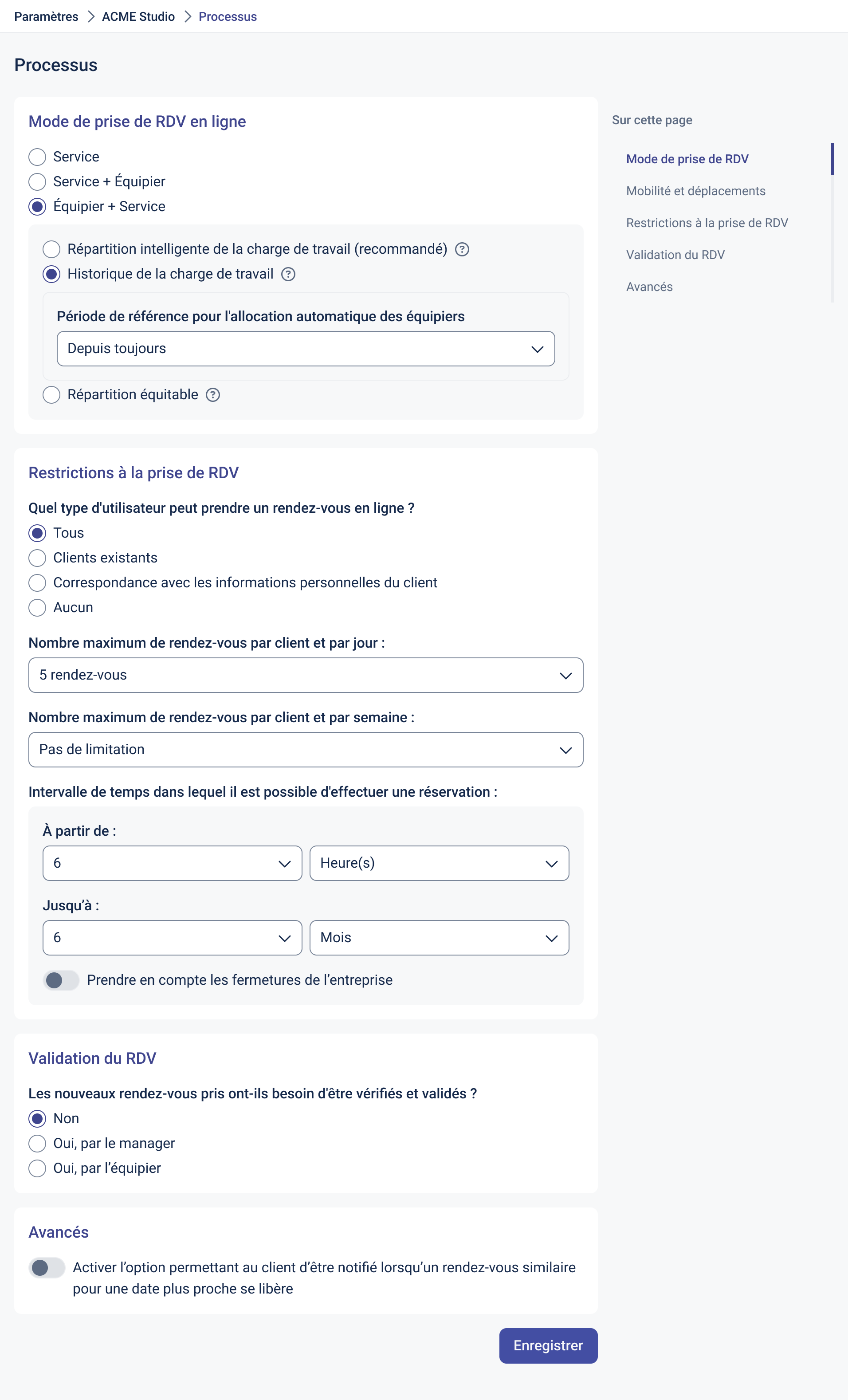
Online Booking Mode
- Service: the client first selects a service, then a time slot.
- Service + Staff: the client selects a service, then a specific staff member.
- Staff + Service: the client chooses a staff member first, then a service.
Workload Distribution
- Smart distribution (recommended): automatically assigns the most relevant staff based on workload history.
- Workload history: reference period used for the distribution algorithm (e.g., Since the beginning).
- Fair distribution: strictly balances assignments equally across staff.
Booking Restrictions
Who can book?
- Everyone: open to all visitors.
- Existing clients: restricted to known contacts.
- Match with client information: validates against known data (e.g., email/phone).
- None: no online booking allowed (closed mode).
Booking limits
- Maximum bookings per client per day: e.g., 5 appointments.
- Maximum bookings per client per week: e.g., No limit or a defined number.
Booking window
- From: minimum delay before an appointment (e.g., 6 hours).
- Up to: maximum booking horizon (e.g., 6 months).
- Consider company closures: the minimum delay set in From is counted taking the location’s closures (closed days, weekends) into account instead of calendar days.
Appointment Validation
- No: new bookings are confirmed automatically.
- Yes, by manager: requires approval by a manager.
- Yes, by staff: requires approval by the staff member concerned.
Advanced Options
- Notification when an earlier slot becomes available: allows clients to be alerted if a similar appointment opens up sooner (smart waitlist).
Saving Your Settings
After making changes, click “Save” to apply the new process rules.
Best Practices
- Use smart distribution with a sufficient workload history to optimize staff allocation.
- Set a clear booking window (minimum delay & maximum horizon) to avoid last-minute no-shows and overly distant bookings.
- Enable validation when availability changes frequently or when quality control is needed.
- Enable the earlier slot notification to improve conversion and reduce waiting times.