Welcome · What's new
New navigation in the settings module
We have redesigned the organization of the settings module to give you a clearer, more intuitive experience that is better suited to managing multiple locations. Here is an overview of the main changes visible in the new interface.
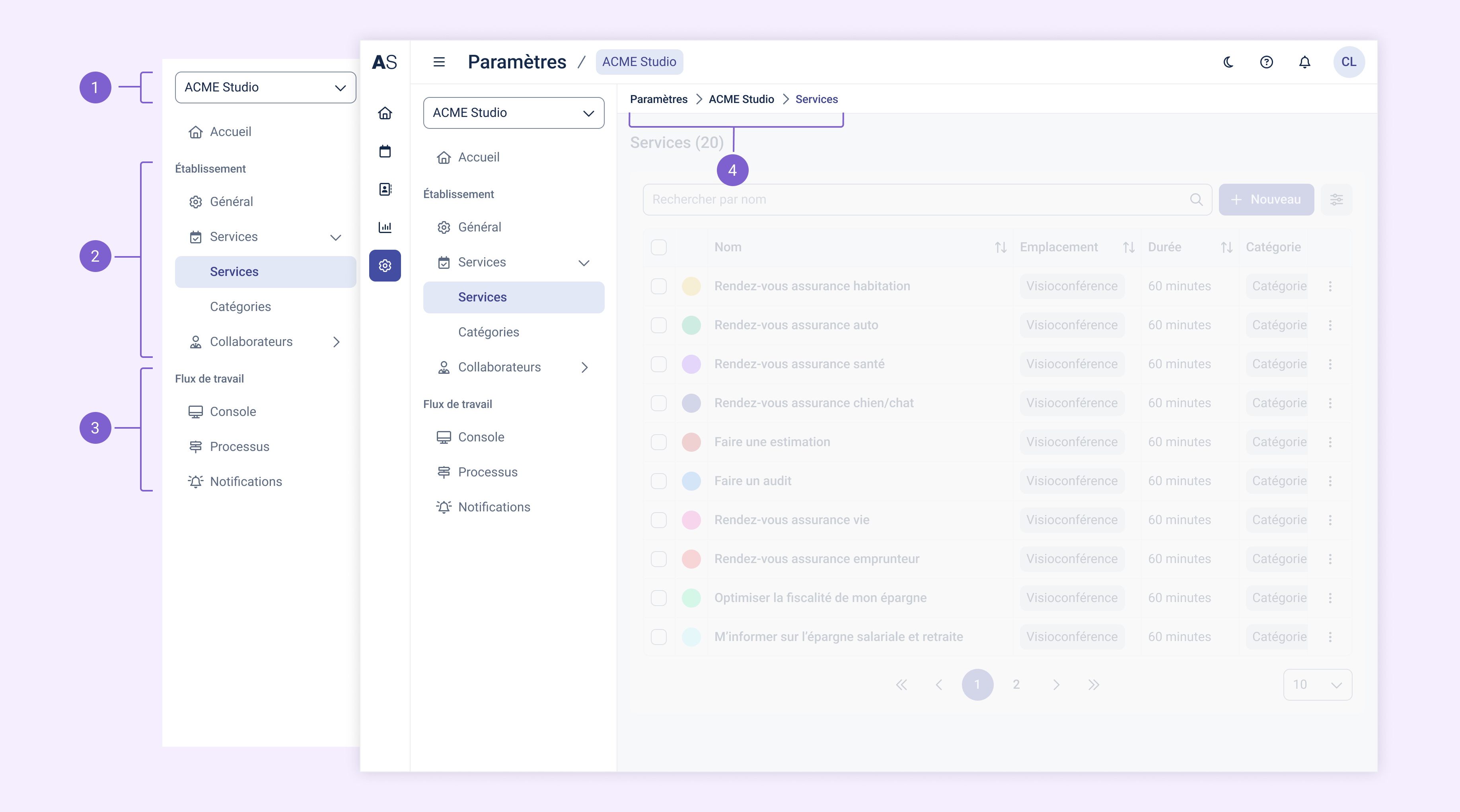
1. Location selector
At the top of the menu (1), a new selector lets you easily switch between your different locations. The content displayed in the module automatically adapts to the selected location. This makes centralized management easier while keeping each entity's own local logic.
2. Location settings
The first part of the menu (2) groups the essential settings for the selected location. It includes the home page, general information, services, categories, collaborators (and their skills), teams and, depending on your plan, resources. These sections let you manage the foundations of the location: its organization, its services and the users associated with it.
3. Workflow
Just below (3), the Workflow section is also specific to the active location. It lets you configure how appointment booking works overall: the collaborators' work interface in the console, the steps of the booking process and notification rules. These elements apply to the entire location, ensuring a consistent customer experience and internal coordination.
4. Easier-to-read navigation
A breadcrumb trail has been added at the top of the page (4) to help you find your way around the interface. It reflects the structure of the menu and adapts as you navigate, making it easier to move back and forth between the different settings levels.
Learn more
You will find articles related to settings in this section.